OpenHands
開源自主軟體工程智能體,支援沙盒終端、瀏覽器與 GitHub Issue 全自動處理。
https://api.bf16.ai/v1openai-completions適用對象
希望將長週期自主 SWE 任務成本壓低 80%+ 的工程團隊。
架構原理與接入優勢
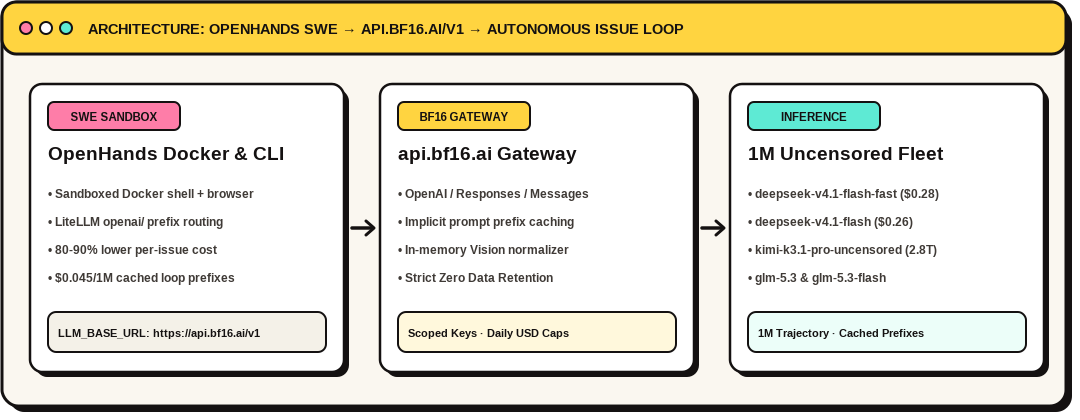
OpenHands executes dozens to hundreds of sandboxed shell commands, test suites, and browser inspections per GitHub issue. Because each step resends the full trajectory, token bills on commercial flagship APIs quickly exceed $5–$20 per task.
Pairing OpenHands with DeepSeek V4.1 Flash Uncensored ($0.26 in / $0.045 cached / $1.00 out) cuts autonomous SWE run costs by 80–90% while maintaining 1M-token context and zero refusal interruptions during security or low-level systems debugging.
指令預設顯示 $BF16_API_KEY。登入並建立金鑰後會自動填入你的真實金鑰。
One-Command OpenHands Headless Config
Exports the exact OpenHands LLM environment variables for headless CLI or Docker runs.
export BF16_API_KEY="sk-bf16-v1-..."
export LLM_API_KEY="$BF16_API_KEY"
export LLM_BASE_URL="https://api.bf16.ai/v1"
export LLM_MODEL="openai/deepseek/deepseek-v4.1-flash-uncensored-fast"
curl https://api.bf16.ai/v1/models -H "Authorization: Bearer $BF16_API_KEY"- 1
設定你的 bf16.ai API 金鑰
Open OpenHands Settings → LLM → toggle Advanced, or pass environment variables into your Docker container.
- 2
填入 bf16.ai 端點與 1M 免審查模型
使用頁面提供的 Base URL 與 API 金鑰,即可立即存取全系 1M 上下文免審查模型(含零留存政策)。
LLM_MODEL=openai/deepseek/deepseek-v4.1-flash-uncensored-fast
LLM_BASE_URL=https://api.bf16.ai/v1
LLM_API_KEY=$BF16_API_KEY
關鍵參數核對清單
openai/deepseek/deepseek-v4.1-flash-uncensored-fastLeading openai/ tells OpenHands’ LiteLLM router to use OpenAI-compatible wire format
https://api.bf16.ai/v1sk-bf16-v1-••••••••••••Automatic ($0.045–$0.055/1M read)推薦模型分層配置
架構規劃使用旗艦模型,高頻子任務與螢幕截圖使用 Flash 模型以節省開銷。
| 工作流角色 | 模型 ID | 選型說明 | USD / 1M Tokens |
|---|---|---|---|
| Autonomous Issue Solving & CI Loops | deepseek/deepseek-v4.1-flash-uncensored | $0.045/1M cached input reads make 80-step OpenHands trajectories remarkably economical. | $0.26 in / $0.045 cached / $1.00 out |
| High-Speed Interactive Sandboxes | deepseek/deepseek-v4.1-flash-uncensored-fast | Cuts wall-clock latency across iterative build-test-fix loops. | $0.28 in / $0.055 cached / $1.12 out |
如何確認設定成功
- 發送測試訊息後,可在 bf16.ai 控制台請求紀錄中即時查看計費與狀態。
- curl https://api.bf16.ai/v1/models -H "Authorization: Bearer $BF16_API_KEY"
生產環境護欄與預算隔離
- Always set max_iterations and a per-key daily USD cap in /dashboard/keys for unattended OpenHands batch jobs.