Orca
開源多 Agent 開發環境與 Bot 調度 IDE(stablyai/orca),安裝官方外掛 bf16-ai.bf16 即刻擁有即時 1M 模型目錄、一鍵啟動與內建 MCP。
https://api.bf16.ai/v1openai-completions適用對象
在 Orca 並行調度 Claude Code、Codex、Hermes Agent 與無人值守 Orca Bots、需要零誤拒 1M 推理的開發團隊。
架構原理與接入優勢
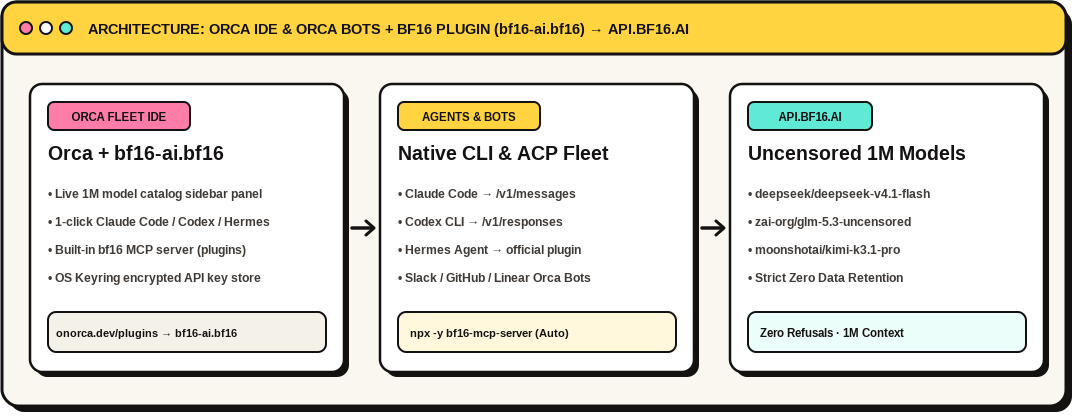
Orca (stablyai/orca, 142k+ ★) is an open-source Agent Development Environment for running fleets of coding agents (Claude Code, Codex, Hermes Agent, OpenCode, Cline, Pi, Goose) in parallel Git worktrees — plus unattended Orca Bots triggered from Slack, Linear, and GitHub.
Install our official open-source Orca plugin (`bf16-ai.bf16`, repo `BF16-AI/bf16-orca-plugin`) directly from Settings → Plugins to get a native bf16.ai sidebar panel with live 1M-context pricing, OS-keyring key checks, 1-click workspace launchers, and the official `bf16` MCP server (`npx -y bf16-mcp-server`) automatically available to every agent Orca spawns.
For unattended Orca Bots and native Orca Chat, pair Orca with our merged Nous Research Hermes Agent plugin (`hermes plugins install bf16-provider --enable`) or point Claude Code (`ANTHROPIC_BASE_URL=https://api.bf16.ai`) and Codex (`OPENAI_BASE_URL=https://api.bf16.ai/v1`) at bf16.ai so parallel agent runs never stall on false-positive safety refusals.
指令預設顯示 $BF16_API_KEY。登入並建立金鑰後會自動填入你的真實金鑰。
Wire Hermes Agent + Orca Bots & Verify Your Key
Installs the official Hermes bf16-provider plugin (recognized automatically by Orca Chat and Orca Bots) and verifies your bf16.ai API key against live 1M-context endpoints.
export BF16_API_KEY="sk-bf16-v1-..."
hermes plugins install bf16-provider --enable
hermes config set model.default "deepseek/deepseek-v4.1-flash-uncensored"
curl https://api.bf16.ai/v1/models -H "Authorization: Bearer $BF16_API_KEY"- 1
設定你的 bf16.ai API 金鑰
Open Orca → Settings → Plugins, search for bf16.ai in the community directory (onorca.dev/plugins) or click Install from Git URL and paste https://github.com/BF16-AI/bf16-orca-plugin. This adds the live bf16.ai sidebar panel, Command Palette actions, status bar indicator, and built-in bf16 MCP server.
https://github.com/BF16-AI/bf16-orca-plugin - 2
填入 bf16.ai 端點與 1M 免審查模型
使用頁面提供的 Base URL 與 API 金鑰,即可立即存取全系 1M 上下文免審查模型(含零留存政策)。
- 3
Launch Claude Code, Codex, or Hermes Agent on bf16.ai
Use the Setup tab (or Command Palette ⌘K → bf16.ai: Launch ...) to spin up Claude Code or Codex in the focused workspace, or install the official Hermes plugin so Orca Chat and unattended Orca Bots run directly on bf16.ai.
# Claude Code in any Orca workspace
export ANTHROPIC_BASE_URL="https://api.bf16.ai"
export ANTHROPIC_AUTH_TOKEN="$BF16_API_KEY"
export ANTHROPIC_MODEL="deepseek/deepseek-v4.1-flash-uncensored"
claude

# Hermes Agent (native Orca Chat & Orca Bots)
hermes plugins install bf16-provider --enable
關鍵參數核對清單
https://github.com/BF16-AI/bf16-orca-plugin (bf16-ai.bf16)bf16 → npx -y bf16-mcp-server (Settings → MCP → From plugins)https://api.bf16.ai (Anthropic) · https://api.bf16.ai/v1 (OpenAI)hermes plugins install bf16-provider --enableAuto-discovered by Orca native Chat and Orca Bots
推薦模型分層配置
架構規劃使用旗艦模型,高頻子任務與螢幕截圖使用 Flash 模型以節省開銷。
| 工作流角色 | 模型 ID | 選型說明 | USD / 1M Tokens |
|---|---|---|---|
| Parallel Worktree Workers & Orca Bots (Fast + Vision) | deepseek/deepseek-v4.1-flash-uncensored | 1M context, ~155 tok/s throughput, multimodal screenshots, and $0.045/1M cached prompt reads keep multi-worker Orca fleets fast and affordable. | $0.26 in / $0.045 cached / $1.00 out |
| Coordinator Agent, Security Audits & Complex PR Reviews | zai-org/glm-5.3-uncensored | Native Anthropic Messages + OpenAI Responses tool calling with zero false-positive refusals on auth, crypto, and security diffs. | $1.35 in / $0.25 cached / $4.20 out |
| Zero-Markup Fleet Router | bf16/auto:coding | Automatically picks the highest tool-and-code adherence uncensored endpoint across your Orca workspaces. | Model rate · $0 router fee |
如何確認設定成功
- 發送測試訊息後,可在 bf16.ai 控制台請求紀錄中即時查看計費與狀態。
- curl https://api.bf16.ai/v1/models -H "Authorization: Bearer $BF16_API_KEY"
生產環境護欄與預算隔離
- Create a dedicated API key with a daily USD spend cap in /dashboard/keys before assigning unattended Orca Bots to high-volume GitHub or Slack triggers.
- Orca runs each worker in an isolated Git worktree — pairing Orca’s workspace isolation with bf16.ai weight-level uncensored models keeps security boundaries inside Orca rather than upstream safety filters.