T3 Code
開源桌面/Web/行動端編程智能體控制面(pingdotgg/t3code),透過獨立 CLAUDE_CONFIG_DIR 與環境變數直連 bf16.ai 1M 免審查模型。
https://api.bf16.aianthropic-messages適用對象
在 T3 Code 桌面與 iOS/Android 遠端審批多 Worktree 任務、希望並行掛接 bf16.ai 獨立設定檔的開發者。
架構原理與接入優勢
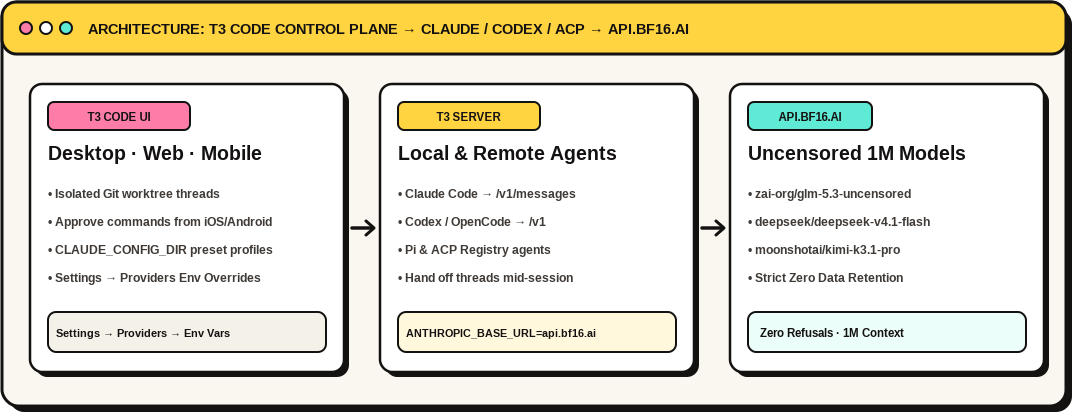
T3 Code (pingdotgg/t3code, 81k+ ★) is an MIT-licensed control plane that drives the coding agents installed on your machine (Claude Code, Codex, OpenCode, Pi, Cursor, and any ACP Registry agent) across desktop, web, and native iOS/Android apps with per-thread Git worktrees.
Because T3 Code natively supports multiple isolated provider instances (`CLAUDE_CONFIG_DIR` for Claude Code and per-instance **Environment variables** in Settings → Providers), you can add a dedicated **bf16.ai** Claude or Codex profile right alongside your existing subscriptions and switch or hand off threads at any time.
Pointing a T3 Code Claude instance at `ANTHROPIC_BASE_URL=https://api.bf16.ai` gives you native Anthropic Messages (`/v1/messages` + `/v1/messages/count_tokens`) with adaptive thinking, parallel tool calls, 1M context, strict ZDR, and zero false-positive refusals — even when approving runs remotely from your phone.
指令預設顯示 $BF16_API_KEY。登入並建立金鑰後會自動填入你的真實金鑰。
Initialize an Isolated ~/.claude_bf16 Profile & Verify Endpoint
Creates a clean CLAUDE_CONFIG_DIR directory for your bf16.ai T3 Code Claude instance and runs a live API check against api.bf16.ai.
export BF16_API_KEY="sk-bf16-v1-..."
mkdir -p "$HOME/.claude_bf16"
curl https://api.bf16.ai/v1/models -H "Authorization: Bearer $BF16_API_KEY"- 1
設定你的 bf16.ai API 金鑰
Keep your bf16.ai provider instance cleanly separated from any personal Claude or Codex subscription by creating a dedicated directory (e.g. `~/.claude_bf16`).
mkdir -p ~/.claude_bf16 - 2
填入 bf16.ai 端點與 1M 免審查模型
使用頁面提供的 Base URL 與 API 金鑰,即可立即存取全系 1M 上下文免審查模型(含零留存政策)。
ANTHROPIC_BASE_URL=https://api.bf16.ai ANTHROPIC_AUTH_TOKEN=sk-bf16-v1-... ANTHROPIC_MODEL=zai-org/glm-5.3-uncensored ANTHROPIC_SMALL_FAST_MODEL=deepseek/deepseek-v4.1-flash-uncensored - 3
Optional: Wire Codex or OpenCode Instances in T3 Code
For Codex or OpenCode instances on the same T3 Code server, set OpenAI-compatible environment variables pointing to `https://api.bf16.ai/v1`.
OPENAI_BASE_URL=https://api.bf16.ai/v1
OPENAI_API_KEY=sk-bf16-v1-...
關鍵參數核對清單
~/.claude_bf16Keeps your bf16.ai preset isolated from your default Claude login
https://api.bf16.aiNo /v1 suffix — Claude Code appends /v1/messages automatically
sk-bf16-v1-...zai-org/glm-5.3-uncensored推薦模型分層配置
架構規劃使用旗艦模型,高頻子任務與螢幕截圖使用 Flash 模型以節省開銷。
| 工作流角色 | 模型 ID | 選型說明 | USD / 1M Tokens |
|---|---|---|---|
| Primary T3 Code Claude Threads (Native /v1/messages) | zai-org/glm-5.3-uncensored | Full Anthropic Messages adaptive thinking + 1M context window for multi-file Git worktree diffs and code reviews. | $1.35 in / $0.25 cached / $4.20 out |
| High-Speed Parallel Threads & Mobile Approvals | deepseek/deepseek-v4.1-flash-uncensored | 1M context at ~155 tok/s with vision support and $0.045/1M cached prompt reads. | $0.26 in / $0.045 cached / $1.00 out |
| Zero-Markup Coding Router | bf16/auto:coding | Auto-routes threads to the highest code-adherence uncensored endpoint. | Model rate · $0 router fee |
如何確認設定成功
- 發送測試訊息後,可在 bf16.ai 控制台請求紀錄中即時查看計費與狀態。
- curl https://api.bf16.ai/v1/models -H "Authorization: Bearer $BF16_API_KEY"
生產環境護欄與預算隔離
- Follow T3 Code’s security guidance: put `ANTHROPIC_AUTH_TOKEN` in **Environment variables**, never in Launch arguments.
- If running T3 Code on a remote host via T3 Connect, configure the environment variables on the target environment first.