所有用戶端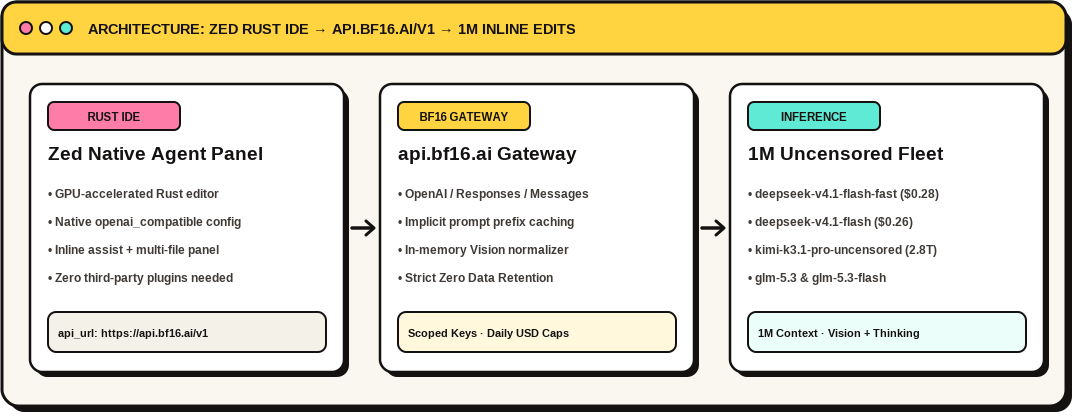
Configure bf16.ai under language_models.openai_compatible in ~/.config/zed/settings.json for instant model switching.
Rust IDE · Native Agent Panel1M Context · ZDR
Zed
GPU 加速 Rust 程式碼編輯器,內建原生 OpenAI 相容 Agent 面板與行內重構助手。
基礎網址
https://api.bf16.ai/v1協定
openai-completions適用對象
希望在 Zed 免外掛直連 1M 上下文免審查高速模型的開發者。
架構原理與接入優勢
Zed’s native Agent Panel supports custom OpenAI-compatible providers directly in settings.json with zero plugins required.
Pairing Zed with DeepSeek V4.1 Flash Uncensored Fast ($0.28/$1.12) gives sub-second inline code completions, while Kimi K3.1 Pro Uncensored ($1.95/$6.90) handles complex multi-file architecture threads across a full 1M token window.
指令預設顯示 $BF16_API_KEY。登入並建立金鑰後會自動填入你的真實金鑰。
一鍵快速配置
Verify Your Key & Print Zed Provider JSON
Tests your API key and outputs the exact openai_compatible block to paste into ~/.config/zed/settings.json.
export BF16_API_KEY="sk-bf16-v1-..."
curl https://api.bf16.ai/v1/models -H "Authorization: Bearer $BF16_API_KEY"- 1
設定你的 bf16.ai API 金鑰
Open Zed settings (⌘,) and add the openai_compatible block below.
~/.config/zed/settings.json{ "language_models": { "openai_compatible": { "bf16": { "api_url": "https://api.bf16.ai/v1", "available_models": [ { "name": "deepseek/deepseek-v4.1-flash-uncensored-fast", "display_name": "DeepSeek V4.1 Flash Fast (bf16)", "max_tokens": 1048576, "max_output_tokens": 130000, "capabilities": { "tools": true, "images": true, "thinking": true } }, { "name": "moonshotai/kimi-k3.1-pro-uncensored", "display_name": "Kimi K3.1 Pro 2.8T (bf16)", "max_tokens": 1048576, "max_output_tokens": 131072, "capabilities": { "tools": true, "images": true, "thinking": true } } ] } } } } - 2
填入 bf16.ai 端點與 1M 免審查模型
使用頁面提供的 Base URL 與 API 金鑰,即可立即存取全系 1M 上下文免審查模型(含零留存政策)。
Zed — ~/.config/zed/settings.json
介面與設定檔欄位對照Settings (⌘,) → language_models.openai_compatible.bf16
關鍵參數核對清單
api_url
https://api.bf16.ai/v1API Key Env
BF16_API_KEY (or Zed keychain)max_tokens
1048576available_models
deepseek/deepseek-v4.1-flash-uncensored-fast, moonshotai/kimi-k3.1-pro-uncensoredZed stores custom provider API keys securely in your OS keychain once pasted in the Agent Panel configuration modal.
推薦模型分層配置
架構規劃使用旗艦模型,高頻子任務與螢幕截圖使用 Flash 模型以節省開銷。
| 工作流角色 | 模型 ID | 選型說明 | USD / 1M Tokens |
|---|---|---|---|
| Interactive Inline Edits & Agent Turns | deepseek/deepseek-v4.1-flash-uncensored-fast | Matches Zed’s low-latency editing feel with 1M context and $0.055 cached reads. | $0.28 in / $0.055 cached / $1.12 out |
| Heavy Refactoring & Design Reviews | moonshotai/kimi-k3.1-pro-uncensored | 2.8T MoE reasoning with native vision for UI screenshot debugging inside Zed. | $1.95 in / $0.28 cached / $6.90 out |
如何確認設定成功
- 發送測試訊息後,可在 bf16.ai 控制台請求紀錄中即時查看計費與狀態。
- curl https://api.bf16.ai/v1/models -H "Authorization: Bearer $BF16_API_KEY"
生產環境護欄與預算隔離
- Keep max_tokens set to 1048576 so Zed never truncates large file trees prematurely.
常見錯誤
現象
連線測試出現 404 或驗證失敗。
原因
端點網址多加或漏寫了 /v1 後綴。
解法
請嚴格對照本頁顯示的 Base URL 複製貼上。