Dify
Open-Source Plattform für visuelle AI-Workflows, RAG und Multi-Agent-Apps.
https://api.bf16.ai/v1openai-completionsFür wen gedacht
Produktteams auf Dify Cloud oder Self-Hosted Docker mit Bedarf an 1M-Kontext-Modellen.
Architektur & Zusammenspiel mit bf16.ai
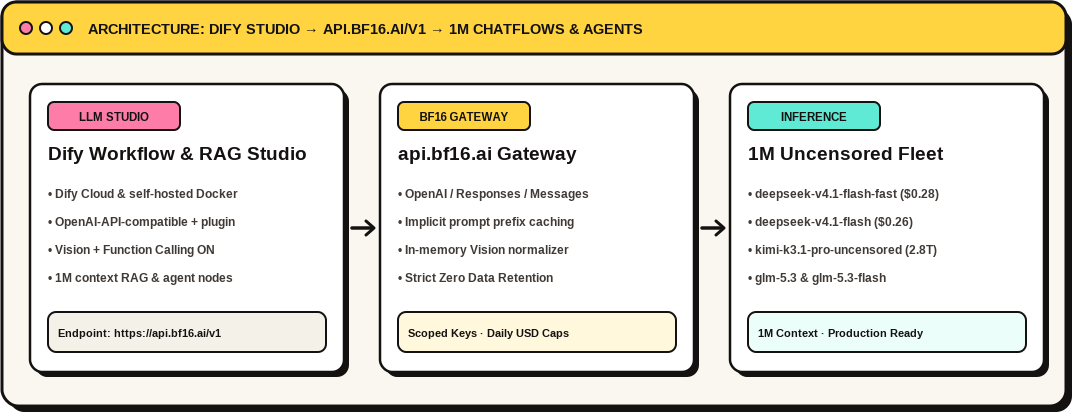
Dify powers production RAG pipelines, chatflows, and visual multi-step agent apps across both Dify Cloud and self-hosted Docker deployments.
Connecting bf16.ai inside Dify’s Model Providers gives every LLM, Question Classifier, and Agent node instant 1M-context uncensored models — with native Vision on DeepSeek V4.1 Flash, GLM-5.3 Flash, and 2.8T Kimi K3.1 Pro, plus zero prompt retention.
In den Befehlen steht $BF16_API_KEY. Melden Sie sich an, um Ihren eigenen Schlüssel automatisch einzusetzen.
Verify Your bf16.ai Key Before Adding to Dify
Tests authentication and prints all live model IDs you can register in Dify.
export BF16_API_KEY="sk-bf16-v1-..."
curl https://api.bf16.ai/v1/models -H "Authorization: Bearer $BF16_API_KEY"- 1
bf16.ai API-Schlüssel konfigurieren
Open Dify Settings → Model Providers → locate OpenAI-API-compatible (or install the open-source bf16.ai plugin from https://github.com/BF16-AI/bf16-dify-plugin).
- 2
bf16.ai Endpunkt & 1M unzensierte Modelle verbinden
Trage die angezeigte Base URL und deinen API-Schlüssel ein, um sofort 1M-Kontext-Modelle mit Zero Data Retention (ZDR) zu nutzen.
API Endpoint URL: https://api.bf16.ai/v1
API Key:          $BF16_API_KEY
Model Name:       deepseek/deepseek-v4.1-flash-uncensored-fast
Context Size:     1048576
Feld-für-Feld-Referenz
LLM (Chat · Function Call + Vision)deepseek/deepseek-v4.1-flash-uncensored-fastsk-bf16-v1-••••••••••••https://api.bf16.ai/v1Empfohlene Modell-Aufteilung
Planung über Flagship-Modelle, schnelle Subtasks und Screenshots über Flash-Modelle.
| Rolle | Modell-ID | Einsatzgrund | USD / 1M Tokens |
|---|---|---|---|
| Fast Chatflows & Agent Routing | deepseek/deepseek-v4.1-flash-uncensored-fast | Snappy streaming, native vision, and low cost across high-traffic Dify apps. | $0.28 in / $0.055 cached / $1.12 out |
| 2.8T Flagship Research & Synthesis Nodes | moonshotai/kimi-k3.1-pro-uncensored | Ideal for final report generation, complex analysis, and long-context RAG nodes. | $1.95 in / $0.28 cached / $6.90 out |
So prüfen Sie, ob es funktioniert
- Nach dem ersten Test erscheint der Aufruf sofort im bf16.ai Request-Log.
- curl https://api.bf16.ai/v1/models -H "Authorization: Bearer $BF16_API_KEY"
Produktions-Guardrails & Budget-Limits
- Isolate production vs staging Dify apps with separate scoped API keys and daily USD spend caps.