n8n
Führende Open-Source Workflow-Automatisierung mit AI-Agent- und Structured-Output-Nodes.
https://api.bf16.ai/v1openai-completionsFür wen gedacht
Automatisierungs-Teams mit 24/7-Webhooks, die zuverlässige JSON-Ausgaben ohne Ablehnungen brauchen.
Architektur & Zusammenspiel mit bf16.ai
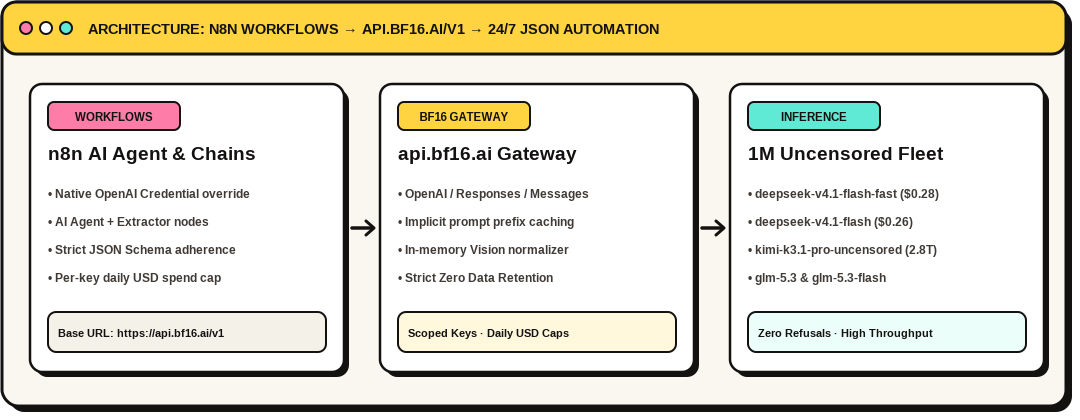
n8n workflows run unattended across thousands of webhook executions per day — summarizing tickets, parsing scraped pages, moderating user content, and triggering downstream APIs. A single false-positive safety refusal returns prose instead of JSON and crashes the entire workflow branch.
Pointing n8n’s native OpenAI Chat Model credential to https://api.bf16.ai/v1 gives every AI Agent and Basic LLM Chain node strict JSON Schema adherence, 1M context, zero false refusals, and $0.26/$1.00 Flash economics.
In den Befehlen steht $BF16_API_KEY. Melden Sie sich an, um Ihren eigenen Schlüssel automatisch einzusetzen.
Smoke-Test Your n8n Key & Structured Output Endpoint
Verifies API key authentication and model discovery from your n8n host before activating workflows.
export BF16_API_KEY="sk-bf16-v1-..."
curl https://api.bf16.ai/v1/models -H "Authorization: Bearer $BF16_API_KEY"- 1
bf16.ai API-Schlüssel konfigurieren
In n8n, open Credentials → Add Credential → OpenAI. Paste your API key and set Base URL to https://api.bf16.ai/v1.
API Key: $BF16_API_KEY Base URL: https://api.bf16.ai/v1 - 2
bf16.ai Endpunkt & 1M unzensierte Modelle verbinden
Trage die angezeigte Base URL und deinen API-Schlüssel ein, um sofort 1M-Kontext-Modelle mit Zero Data Retention (ZDR) zu nutzen.
Feld-für-Feld-Referenz
sk-bf16-v1-••••••••••••https://api.bf16.ai/v1deepseek/deepseek-v4.1-flash-uncensoredAlso supports zai-org/glm-5.3-flash-uncensored for strict JSON extraction
Zero Prompt Retention · 1M ContextEmpfohlene Modell-Aufteilung
Planung über Flagship-Modelle, schnelle Subtasks und Screenshots über Flash-Modelle.
| Rolle | Modell-ID | Einsatzgrund | USD / 1M Tokens |
|---|---|---|---|
| 24/7 Webhook & Batch Automation | deepseek/deepseek-v4.1-flash-uncensored | High throughput (~155 tok/s) and $0.045/1M cached prompt reads keep 10,000-run workflows affordable. | $0.26 in / $0.045 cached / $1.00 out |
| Strict JSON Schema Extraction | zai-org/glm-5.3-flash-uncensored | Rock-solid structured JSON outputs + vision for invoice, UI, and document pipelines. | $0.30 in / $0.065 cached / $1.12 out |
So prüfen Sie, ob es funktioniert
- Nach dem ersten Test erscheint der Aufruf sofort im bf16.ai Request-Log.
- curl https://api.bf16.ai/v1/models -H "Authorization: Bearer $BF16_API_KEY"
Produktions-Guardrails & Budget-Limits
- Create a dedicated API key with a daily USD spend cap in /dashboard/keys for every production n8n instance to guard against infinite webhook loops.