Magpie
Gateway locale multi-agente (yetone/magpie) che unisce abbonamenti e chiavi API con routing nativo Chat, Responses e Anthropic su bf16.ai.
https://api.bf16.ai/v1openai-completionsPer chi è pensato
Sviluppatori che instradano Claude Code, Codex, OpenCode e Cursor tramite Magpie verso modelli 1M non censurati.
Architettura e Integrazione con bf16.ai
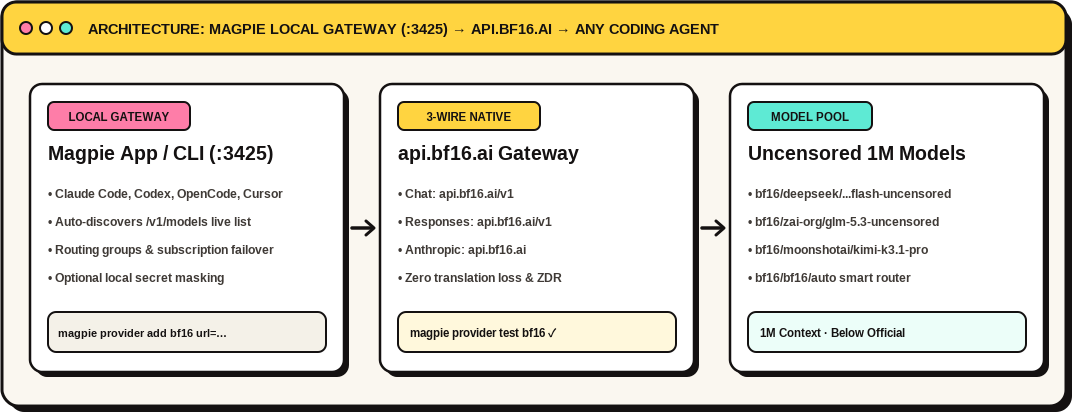
Magpie (yetone/magpie, 42k+ ★) unifies all of your coding subscriptions and pay-as-you-go API keys behind a single local app and localhost gateway (:3425), letting you assign any model to Claude Code, Codex, OpenCode, Cursor, or Hermes from one list — with routing groups and automatic failover when a subscription quota runs dry.
Because api.bf16.ai speaks all three wire protocols natively (OpenAI Chat Completions, OpenAI Responses, and Anthropic Messages) and publishes structured `/v1/models` capability metadata, adding bf16.ai as a custom provider in Magpie immediately discovers all live 1M-context uncensored models and passes `magpie provider test bf16` across every endpoint.
Configurazione
Accedi per inserire la tua chiave API →I comandi mostrano $BF16_API_KEY. Accedi per inserire automaticamente la tua chiave reale.
One-Command Magpie 3-Protocol Provider Setup & Verification
Registers bf16 in Magpie with native Chat, Responses, and Anthropic endpoints, auto-fetches all live models from api.bf16.ai/v1/models, and runs Magpie’s built-in 3-protocol health check.
export BF16_API_KEY="sk-bf16-v1-..."
magpie provider add bf16 \
  url=https://api.bf16.ai/v1 \
  responses=https://api.bf16.ai/v1 \
  anthropic=https://api.bf16.ai \
  key="$BF16_API_KEY"
magpie provider test bf16- 1
Configura la tua chiave API bf16.ai
Register bf16 once with https://api.bf16.ai/v1 for Chat/Responses and https://api.bf16.ai for Anthropic Messages. Magpie automatically queries https://api.bf16.ai/v1/models and exposes all active 1M-context models.
magpie provider add bf16 \ url=https://api.bf16.ai/v1 \ responses=https://api.bf16.ai/v1 \ anthropic=https://api.bf16.ai \ key="$BF16_API_KEY" - 2
Collega l’endpoint bf16.ai e i modelli da 1M
Inserisci la Base URL e la chiave API per attivare subito i modelli senza censura da 1M di contesto con zero data retention (ZDR).
magpie provider test bf16
magpie claude bf16/zai-org/glm-5.3-uncensored
magpie codex bf16/deepseek/deepseek-v4.1-flash-uncensored
Riferimento Campo per Campo
bf16https://api.bf16.ai/v1https://api.bf16.ai/v1Optional — lets Codex hit bf16 /v1/responses natively.
https://api.bf16.aiOptional — lets Claude Code hit bf16 /v1/messages natively without translation.
sk-bf16-v1-••••••••••••Modelli Consigliati per Ruolo
Assegna la progettazione ai modelli Flagship e i subtask rapidi o screenshot ai modelli Flash.
| Ruolo | Model ID | Motivazione | USD / 1M Token |
|---|---|---|---|
| Fast Coding, Claude Code Subagents & Vision | bf16/deepseek/deepseek-v4.1-flash-uncensored | High-speed 1M-context coding and screenshot analysis — great as a pay-as-you-go fallback behind subscription pools. | $0.26 in / $0.045 cached / $1.00 out |
| Flagship Engineering & Deep Debugging | bf16/zai-org/glm-5.3-uncensored | Native Anthropic Messages + OpenAI Responses support for complex Claude Code and Codex refactoring sessions. | $1.35 in / $0.25 cached / $4.20 out |
| Zero-Markup Smart Router Fallback | bf16/bf16/auto | Automatically routes to the healthiest uncensored endpoint inside Magpie failover groups. | Model rate · $0 router fee |
Come capire se ha funzionato
- Invia una richiesta di test e verifica la chiamata in tempo reale nei log di bf16.ai.
- curl https://api.bf16.ai/v1/models -H "Authorization: Bearer $BF16_API_KEY"
Guardrail di Produzione e Limiti di Spesa
- Bind all three URLs (`url`, `responses`, `anthropic`) so Claude Code and Codex use bf16.ai natively instead of translating through Chat Completions.
- Create a dedicated bf16.ai API key with a daily USD cap specifically for your Magpie failover pool so runaway agent loops cannot exhaust your balance.