Aider
Terminal Git pair-programmer configured via ~/.aider.conf.yml with 1M-context metadata and Architect/Editor model splitting.
https://api.bf16.ai/v1openai-completions대상 사용자
CLI-first developers who love Aider’s automatic Git commits, repo-map indexing, and `--architect` two-model workflow.
아키텍처 및 bf16.ai 연동 구조
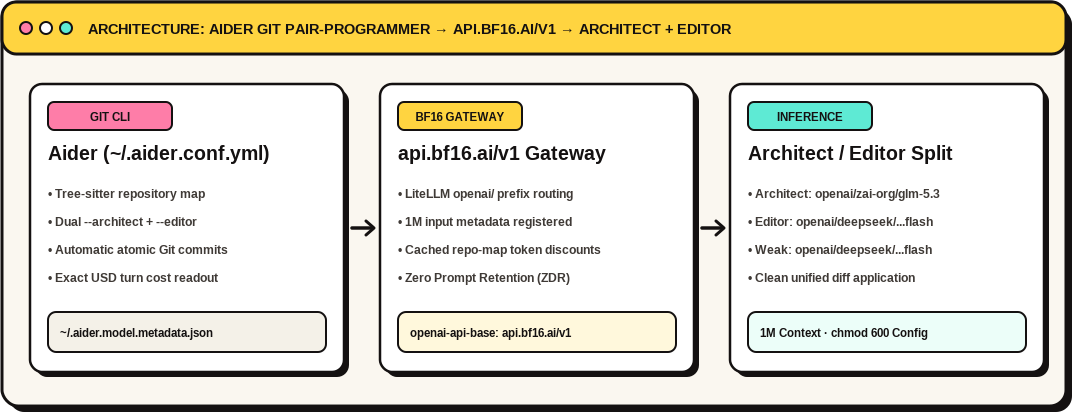
Aider (`aider.chat`) is the gold-standard Git-native CLI coding tool, famous for its tree-sitter repo map and **Architect / Editor** dual-model mode: an Architect model reasons about the problem, then a fast Editor model applies exact unified diffs and commits cleanly.
LiteLLM inside Aider requires custom OpenAI-compatible model IDs to be prefixed with `openai/` (for example `openai/zai-org/glm-5.3-uncensored`), and looks up context limits in `~/.aider.model.metadata.json`. Our One-Command Setup writes both files automatically so Aider displays accurate USD per-turn costs and unlocks the full 1,048,576-token window.
명령어에는 $BF16_API_KEY가 표시됩니다. 로그인하면 내 실제 키가 자동으로 채워집니다.
One-Command Aider Config + 1M Metadata Installer
Backs up ~/.aider.conf.yml if present, writes Architect/Editor config + ~/.aider.model.metadata.json (1M context, Vision, exact bf16 rates), sets chmod 600, and verifies api.bf16.ai.
export BF16_API_KEY="sk-bf16-v1-..."
[ -f ~/.aider.conf.yml ] && cp ~/.aider.conf.yml ~/.aider.conf.yml.bak
umask 077 && cat <<EOF > ~/.aider.conf.yml
openai-api-base: https://api.bf16.ai/v1
openai-api-key: $BF16_API_KEY
model: openai/zai-org/glm-5.3-uncensored
architect: true
editor-model: openai/deepseek/deepseek-v4.1-flash-uncensored
weak-model: openai/deepseek/deepseek-v4.1-flash-uncensored
edit-format: diff
model-metadata-file: ~/.aider.model.metadata.json
EOF
cat <<'EOF' > ~/.aider.model.metadata.json
{
  "openai/zai-org/glm-5.3-uncensored": {
    "max_tokens": 131072, "max_input_tokens": 1048576, "max_output_tokens": 131072,
    "input_cost_per_token": 0.00000135, "output_cost_per_token": 0.0000042,
    "litellm_provider": "openai", "mode": "chat", "supports_function_calling": true
  },
  "openai/deepseek/deepseek-v4.1-flash-uncensored": {
    "max_tokens": 65536, "max_input_tokens": 1048576, "max_output_tokens": 65536,
    "input_cost_per_token": 0.00000026, "output_cost_per_token": 0.000001,
    "litellm_provider": "openai", "mode": "chat", "supports_vision": true, "supports_function_calling": true
  },
  "openai/moonshotai/kimi-k3.1-pro-uncensored": {
    "max_tokens": 131072, "max_input_tokens": 1048576, "max_output_tokens": 131072,
    "input_cost_per_token": 0.0000029, "output_cost_per_token": 0.0000099,
    "litellm_provider": "openai", "mode": "chat", "supports_vision": true, "supports_function_calling": true
  }
}
EOF
curl -fsS "https://api.bf16.ai/v1/models" -H "Authorization: Bearer $BF16_API_KEY" >/dev/null && echo "Installed! Run: aider"- 1
Write ~/.aider.conf.yml with the `openai/` Prefix
Prefix every bf16 model ID with `openai/` so Aider’s internal LiteLLM router uses your openai-api-base instead of guessing a vendor.
~/.aider.conf.ymlopenai-api-base: https://api.bf16.ai/v1 openai-api-key: $BF16_API_KEY model: openai/zai-org/glm-5.3-uncensored architect: true editor-model: openai/deepseek/deepseek-v4.1-flash-uncensored weak-model: openai/deepseek/deepseek-v4.1-flash-uncensored - 2
Register 1M Context & Token Costs in ~/.aider.model.metadata.json
Run the One-Command Setup above (or save the metadata JSON) so Aider knows all three models accept 1,048,576 input tokens.
- 3
Run `aider` Inside Any Git Repository
aider
핵심 설정값 대조표
https://api.bf16.ai/v1sk-bf16-v1-••••••••••••openai/zai-org/glm-5.3-uncensoredNote the required `openai/` LiteLLM routing prefix!
openai/deepseek/deepseek-v4.1-flash-uncensoredHandles fast diff edits & commit messages at $0.26 / $1.00 per 1M.
역할별 권장 모델 구성
복잡한 설계는 플래그십 모델로, 병렬 서브에이전트와 스크린샷은 Flash 모델로 분리하세요.
| 역할 | 모델 ID | 권장 사유 | USD / 1M 토큰 |
|---|---|---|---|
| Architect (`--model`) | zai-org/glm-5.3-uncensored | Plans multi-file changes across huge repo maps without refusal interruptions. | $1.35 in / $0.25 cached / $4.20 out |
| Editor & Commit Messages (`--editor-model`, `--weak-model`) | deepseek/deepseek-v4.1-flash-uncensored | Applies unified diffs and generates commit messages quickly at minimal cost. | $0.26 in / $0.045 cached / $1.00 out |
제대로 작동하는지 확인하는 방법
- Aider startup banner shows Main model: openai/zai-org/glm-5.3-uncensored with editor openai/deepseek/deepseek-v4.1-flash-uncensored and no unknown-context warning.
- Cost summary after your first edit matches bf16.ai/dashboard/logs.
- curl https://api.bf16.ai/v1/models -H "Authorization: Bearer $BF16_API_KEY"
운영 가드레일 및 예산 격리
- Keep ~/.aider.conf.yml mode 0600 or pass OPENAI_API_KEY via environment variable instead of committing `.aider.conf.yml` into a repository.