Orca
오픈소스 멀티 에이전트 IDE 및 Bot 오케스트레이터(stablyai/orca). 공식 플러그인 bf16-ai.bf16으로 실시간 1M 모델 카탈로그, 원클릭 실행, 내장 MCP를 제공합니다.
https://api.bf16.ai/v1openai-completions대상 사용자
Orca에서 Claude Code·Codex·Hermes·무인 Orca Bots를 병렬 운영하며 오탐 거절 없는 1M 추론이 필요한 개발 팀.
아키텍처 및 bf16.ai 연동 구조
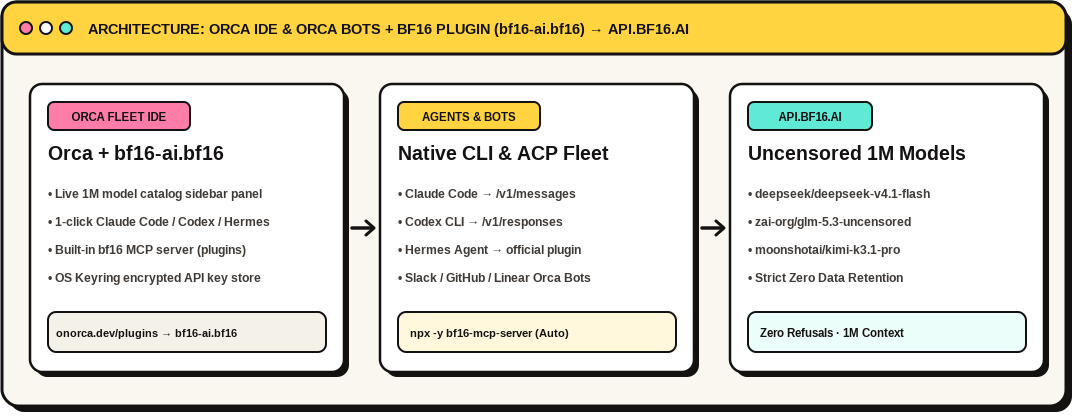
Orca (stablyai/orca, 142k+ ★) is an open-source Agent Development Environment for running fleets of coding agents (Claude Code, Codex, Hermes Agent, OpenCode, Cline, Pi, Goose) in parallel Git worktrees — plus unattended Orca Bots triggered from Slack, Linear, and GitHub.
Install our official open-source Orca plugin (`bf16-ai.bf16`, repo `BF16-AI/bf16-orca-plugin`) directly from Settings → Plugins to get a native bf16.ai sidebar panel with live 1M-context pricing, OS-keyring key checks, 1-click workspace launchers, and the official `bf16` MCP server (`npx -y bf16-mcp-server`) automatically available to every agent Orca spawns.
For unattended Orca Bots and native Orca Chat, pair Orca with our merged Nous Research Hermes Agent plugin (`hermes plugins install bf16-provider --enable`) or point Claude Code (`ANTHROPIC_BASE_URL=https://api.bf16.ai`) and Codex (`OPENAI_BASE_URL=https://api.bf16.ai/v1`) at bf16.ai so parallel agent runs never stall on false-positive safety refusals.
명령어에는 $BF16_API_KEY가 표시됩니다. 로그인하면 내 실제 키가 자동으로 채워집니다.
Wire Hermes Agent + Orca Bots & Verify Your Key
Installs the official Hermes bf16-provider plugin (recognized automatically by Orca Chat and Orca Bots) and verifies your bf16.ai API key against live 1M-context endpoints.
export BF16_API_KEY="sk-bf16-v1-..."
hermes plugins install bf16-provider --enable
hermes config set model.default "deepseek/deepseek-v4.1-flash-uncensored"
curl https://api.bf16.ai/v1/models -H "Authorization: Bearer $BF16_API_KEY"- 1
bf16.ai API 키 설정
Open Orca → Settings → Plugins, search for bf16.ai in the community directory (onorca.dev/plugins) or click Install from Git URL and paste https://github.com/BF16-AI/bf16-orca-plugin. This adds the live bf16.ai sidebar panel, Command Palette actions, status bar indicator, and built-in bf16 MCP server.
https://github.com/BF16-AI/bf16-orca-plugin - 2
bf16.ai 엔드포인트 및 1M 무검열 모델 연결
이 페이지의 Base URL과 API 키를 입력하면 1M 컨텍스트와 엄격한 무저장(ZDR) 정책이 즉시 적용됩니다.
- 3
Launch Claude Code, Codex, or Hermes Agent on bf16.ai
Use the Setup tab (or Command Palette ⌘K → bf16.ai: Launch ...) to spin up Claude Code or Codex in the focused workspace, or install the official Hermes plugin so Orca Chat and unattended Orca Bots run directly on bf16.ai.
# Claude Code in any Orca workspace
export ANTHROPIC_BASE_URL="https://api.bf16.ai"
export ANTHROPIC_AUTH_TOKEN="$BF16_API_KEY"
export ANTHROPIC_MODEL="deepseek/deepseek-v4.1-flash-uncensored"
claude

# Hermes Agent (native Orca Chat & Orca Bots)
hermes plugins install bf16-provider --enable
핵심 설정값 대조표
https://github.com/BF16-AI/bf16-orca-plugin (bf16-ai.bf16)bf16 → npx -y bf16-mcp-server (Settings → MCP → From plugins)https://api.bf16.ai (Anthropic) · https://api.bf16.ai/v1 (OpenAI)hermes plugins install bf16-provider --enableAuto-discovered by Orca native Chat and Orca Bots
역할별 권장 모델 구성
복잡한 설계는 플래그십 모델로, 병렬 서브에이전트와 스크린샷은 Flash 모델로 분리하세요.
| 역할 | 모델 ID | 권장 사유 | USD / 1M 토큰 |
|---|---|---|---|
| Parallel Worktree Workers & Orca Bots (Fast + Vision) | deepseek/deepseek-v4.1-flash-uncensored | 1M context, ~155 tok/s throughput, multimodal screenshots, and $0.045/1M cached prompt reads keep multi-worker Orca fleets fast and affordable. | $0.26 in / $0.045 cached / $1.00 out |
| Coordinator Agent, Security Audits & Complex PR Reviews | zai-org/glm-5.3-uncensored | Native Anthropic Messages + OpenAI Responses tool calling with zero false-positive refusals on auth, crypto, and security diffs. | $1.35 in / $0.25 cached / $4.20 out |
| Zero-Markup Fleet Router | bf16/auto:coding | Automatically picks the highest tool-and-code adherence uncensored endpoint across your Orca workspaces. | Model rate · $0 router fee |
제대로 작동하는지 확인하는 방법
- 테스트 메시지를 보내면 bf16.ai 콘솔 요청 로그에서 즉시 확인할 수 있습니다.
- curl https://api.bf16.ai/v1/models -H "Authorization: Bearer $BF16_API_KEY"
운영 가드레일 및 예산 격리
- Create a dedicated API key with a daily USD spend cap in /dashboard/keys before assigning unattended Orca Bots to high-volume GitHub or Slack triggers.
- Orca runs each worker in an isolated Git worktree — pairing Orca’s workspace isolation with bf16.ai weight-level uncensored models keeps security boundaries inside Orca rather than upstream safety filters.