T3 Code
데스크톱·웹·모바일 코딩 에이전트 컨트롤 플레인(pingdotgg/t3code). 독립 CLAUDE_CONFIG_DIR 및 환경 변수로 bf16.ai를 깔끔하게 연결합니다.
https://api.bf16.aianthropic-messages대상 사용자
T3 Code에서 다중 워크트리 스레드와 모바일 승인으로 1M 무검열 모델을 활용하려는 개발자.
아키텍처 및 bf16.ai 연동 구조
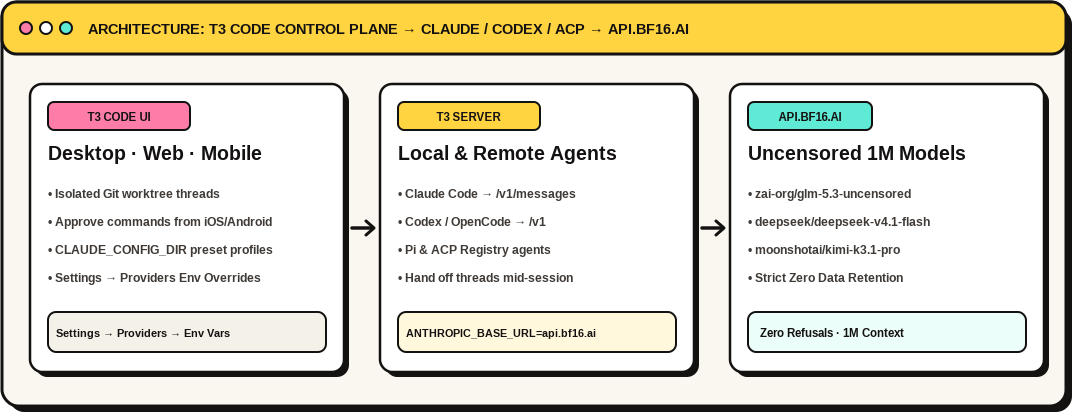
T3 Code (pingdotgg/t3code, 81k+ ★) is an MIT-licensed control plane that drives the coding agents installed on your machine (Claude Code, Codex, OpenCode, Pi, Cursor, and any ACP Registry agent) across desktop, web, and native iOS/Android apps with per-thread Git worktrees.
Because T3 Code natively supports multiple isolated provider instances (`CLAUDE_CONFIG_DIR` for Claude Code and per-instance **Environment variables** in Settings → Providers), you can add a dedicated **bf16.ai** Claude or Codex profile right alongside your existing subscriptions and switch or hand off threads at any time.
Pointing a T3 Code Claude instance at `ANTHROPIC_BASE_URL=https://api.bf16.ai` gives you native Anthropic Messages (`/v1/messages` + `/v1/messages/count_tokens`) with adaptive thinking, parallel tool calls, 1M context, strict ZDR, and zero false-positive refusals — even when approving runs remotely from your phone.
명령어에는 $BF16_API_KEY가 표시됩니다. 로그인하면 내 실제 키가 자동으로 채워집니다.
Initialize an Isolated ~/.claude_bf16 Profile & Verify Endpoint
Creates a clean CLAUDE_CONFIG_DIR directory for your bf16.ai T3 Code Claude instance and runs a live API check against api.bf16.ai.
export BF16_API_KEY="sk-bf16-v1-..."
mkdir -p "$HOME/.claude_bf16"
curl https://api.bf16.ai/v1/models -H "Authorization: Bearer $BF16_API_KEY"- 1
bf16.ai API 키 설정
Keep your bf16.ai provider instance cleanly separated from any personal Claude or Codex subscription by creating a dedicated directory (e.g. `~/.claude_bf16`).
mkdir -p ~/.claude_bf16 - 2
bf16.ai 엔드포인트 및 1M 무검열 모델 연결
이 페이지의 Base URL과 API 키를 입력하면 1M 컨텍스트와 엄격한 무저장(ZDR) 정책이 즉시 적용됩니다.
ANTHROPIC_BASE_URL=https://api.bf16.ai ANTHROPIC_AUTH_TOKEN=sk-bf16-v1-... ANTHROPIC_MODEL=zai-org/glm-5.3-uncensored ANTHROPIC_SMALL_FAST_MODEL=deepseek/deepseek-v4.1-flash-uncensored - 3
Optional: Wire Codex or OpenCode Instances in T3 Code
For Codex or OpenCode instances on the same T3 Code server, set OpenAI-compatible environment variables pointing to `https://api.bf16.ai/v1`.
OPENAI_BASE_URL=https://api.bf16.ai/v1
OPENAI_API_KEY=sk-bf16-v1-...
핵심 설정값 대조표
~/.claude_bf16Keeps your bf16.ai preset isolated from your default Claude login
https://api.bf16.aiNo /v1 suffix — Claude Code appends /v1/messages automatically
sk-bf16-v1-...zai-org/glm-5.3-uncensored역할별 권장 모델 구성
복잡한 설계는 플래그십 모델로, 병렬 서브에이전트와 스크린샷은 Flash 모델로 분리하세요.
| 역할 | 모델 ID | 권장 사유 | USD / 1M 토큰 |
|---|---|---|---|
| Primary T3 Code Claude Threads (Native /v1/messages) | zai-org/glm-5.3-uncensored | Full Anthropic Messages adaptive thinking + 1M context window for multi-file Git worktree diffs and code reviews. | $1.35 in / $0.25 cached / $4.20 out |
| High-Speed Parallel Threads & Mobile Approvals | deepseek/deepseek-v4.1-flash-uncensored | 1M context at ~155 tok/s with vision support and $0.045/1M cached prompt reads. | $0.26 in / $0.045 cached / $1.00 out |
| Zero-Markup Coding Router | bf16/auto:coding | Auto-routes threads to the highest code-adherence uncensored endpoint. | Model rate · $0 router fee |
제대로 작동하는지 확인하는 방법
- 테스트 메시지를 보내면 bf16.ai 콘솔 요청 로그에서 즉시 확인할 수 있습니다.
- curl https://api.bf16.ai/v1/models -H "Authorization: Bearer $BF16_API_KEY"
운영 가드레일 및 예산 격리
- Follow T3 Code’s security guidance: put `ANTHROPIC_AUTH_TOKEN` in **Environment variables**, never in Launch arguments.
- If running T3 Code on a remote host via T3 Connect, configure the environment variables on the target environment first.