Zed
네이티브 OpenAI 호환 에이전트 패널을 내장한 초고속 Rust 코드 에디터.
https://api.bf16.ai/v1openai-completions대상 사용자
플러그인 없이 Zed에서 1M 컨텍스트 무검열 고속 모델을 종량제로 쓰려는 개발자.
아키텍처 및 bf16.ai 연동 구조
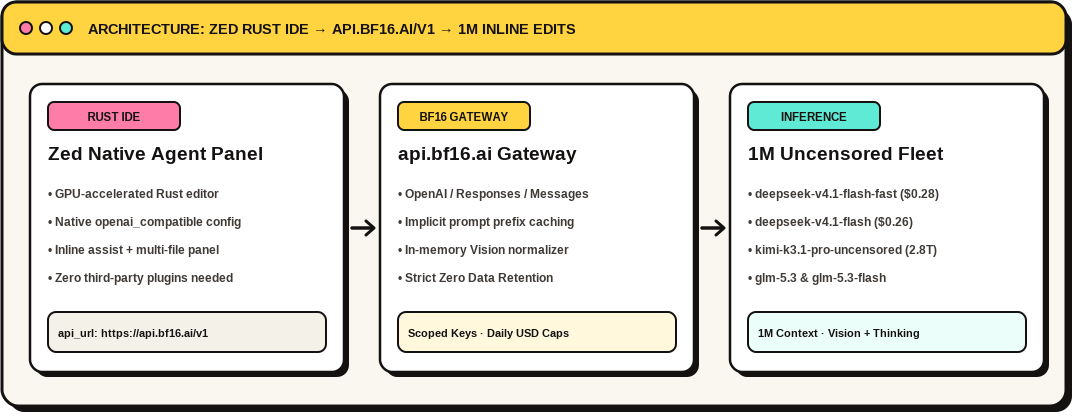
Zed’s native Agent Panel supports custom OpenAI-compatible providers directly in settings.json with zero plugins required.
Pairing Zed with DeepSeek V4.1 Flash Uncensored Fast ($0.28/$1.12) gives sub-second inline code completions, while Kimi K3.1 Pro Uncensored ($1.95/$6.90) handles complex multi-file architecture threads across a full 1M token window.
명령어에는 $BF16_API_KEY가 표시됩니다. 로그인하면 내 실제 키가 자동으로 채워집니다.
Verify Your Key & Print Zed Provider JSON
Tests your API key and outputs the exact openai_compatible block to paste into ~/.config/zed/settings.json.
export BF16_API_KEY="sk-bf16-v1-..."
curl https://api.bf16.ai/v1/models -H "Authorization: Bearer $BF16_API_KEY"- 1
bf16.ai API 키 설정
Open Zed settings (⌘,) and add the openai_compatible block below.
~/.config/zed/settings.json{ "language_models": { "openai_compatible": { "bf16": { "api_url": "https://api.bf16.ai/v1", "available_models": [ { "name": "deepseek/deepseek-v4.1-flash-uncensored-fast", "display_name": "DeepSeek V4.1 Flash Fast (bf16)", "max_tokens": 1048576, "max_output_tokens": 130000, "capabilities": { "tools": true, "images": true, "thinking": true } }, { "name": "moonshotai/kimi-k3.1-pro-uncensored", "display_name": "Kimi K3.1 Pro 2.8T (bf16)", "max_tokens": 1048576, "max_output_tokens": 131072, "capabilities": { "tools": true, "images": true, "thinking": true } } ] } } } } - 2
bf16.ai 엔드포인트 및 1M 무검열 모델 연결
이 페이지의 Base URL과 API 키를 입력하면 1M 컨텍스트와 엄격한 무저장(ZDR) 정책이 즉시 적용됩니다.
핵심 설정값 대조표
https://api.bf16.ai/v1BF16_API_KEY (or Zed keychain)1048576deepseek/deepseek-v4.1-flash-uncensored-fast, moonshotai/kimi-k3.1-pro-uncensored역할별 권장 모델 구성
복잡한 설계는 플래그십 모델로, 병렬 서브에이전트와 스크린샷은 Flash 모델로 분리하세요.
| 역할 | 모델 ID | 권장 사유 | USD / 1M 토큰 |
|---|---|---|---|
| Interactive Inline Edits & Agent Turns | deepseek/deepseek-v4.1-flash-uncensored-fast | Matches Zed’s low-latency editing feel with 1M context and $0.055 cached reads. | $0.28 in / $0.055 cached / $1.12 out |
| Heavy Refactoring & Design Reviews | moonshotai/kimi-k3.1-pro-uncensored | 2.8T MoE reasoning with native vision for UI screenshot debugging inside Zed. | $1.95 in / $0.28 cached / $6.90 out |
제대로 작동하는지 확인하는 방법
- 테스트 메시지를 보내면 bf16.ai 콘솔 요청 로그에서 즉시 확인할 수 있습니다.
- curl https://api.bf16.ai/v1/models -H "Authorization: Bearer $BF16_API_KEY"
운영 가드레일 및 예산 격리
- Keep max_tokens set to 1048576 so Zed never truncates large file trees prematurely.